v1.0.0 — Laravel 11 & 12

Security audits for
Laravel, automated.

Vigil scans your application for common vulnerabilities and misconfigurations. 15 built-in checks, a 0–100 security score, and an optional Filament v5 dashboard.

$ composer require filastudio/laravel-vigil
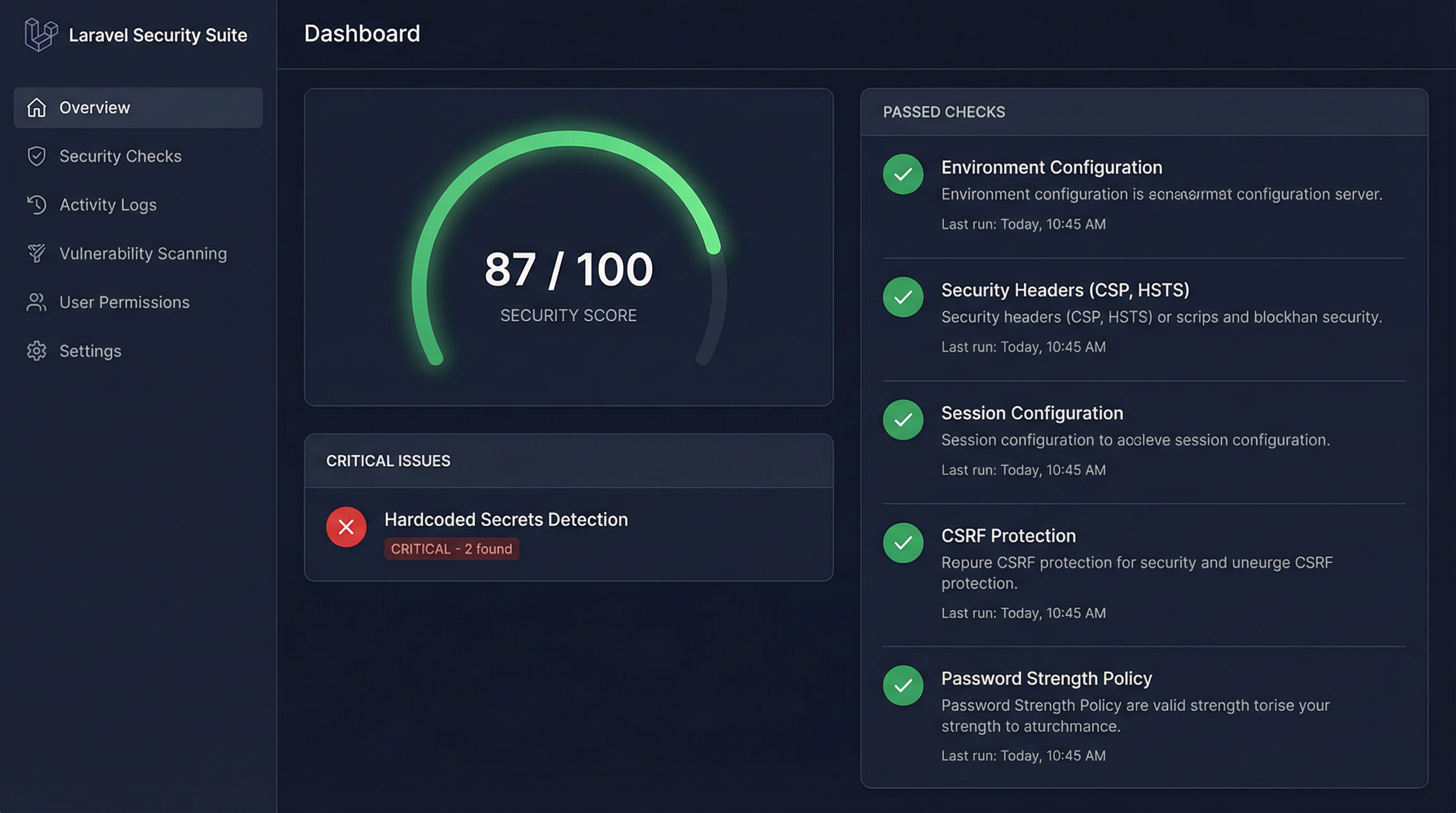
Laravel Vigil Dashboard
15
Built-in Security Checks
5
Check Categories
0–100
Security Score Range
MIT
Open Source License
Features

Everything you need to audit
your Laravel application

Automate the tedious task of securing Laravel applications. Stop doing manual security reviews and let Vigil do the heavy lifting.

15 Built-in Checks

Comprehensive checks grouped into 5 categories: filesystem, configuration, HTTP headers, dependencies, and extended checks.

Secret Detection

Scans your codebase for hardcoded API keys, passwords, and tokens. Smart env() filtering reduces false positives.

Security Scoring

Get a security score from 0 to 100 based on your check results. Track your progress over time and identify areas for improvement.

File Integrity Monitoring

Generate SHA-256 baselines of your public files and detect unauthorized modifications on subsequent scans.

Filament v5 Dashboard

An optional, beautiful Filament v5 dashboard with scan history, score widgets, and one-click scanning for teams.

Fully Extensible

Create custom security checks by implementing the SecurityCheck interface. Register them in a service provider.

CI/CD Integration

Use --fail-on=critical,high to exit with code 1 when vulnerabilities are found. Works with GitHub Actions, GitLab CI, Jenkins.

JSON & Table Output

Output results as a human-readable table or machine-readable JSON. Write reports to files for archiving or compliance.

Scan History

Store scan results in your database with configurable retention periods. Track security trends over time automatically.

See it in action

Run your first audit
in seconds

After installing the package, a single Artisan command gives you a complete security overview. Use --detailed to see exact file paths, line numbers, and actionable fix suggestions.

  • Low noise

    Each check is tuned to avoid false positives. The secret scanner understands env() calls.

  • Useful output

    Failed checks include the exact file, line number, and a concrete fix suggestion.

  • Reasonable performance

    File scanning respects size limits so it won't choke on large codebases.

php artisan vigil:audit --detailed
user@host:~$ php artisan vigil:audit +──────────────────────────────────────+───────────────+──────────+──────────+ │ Check │ Category │ Severity │ Status │ +──────────────────────────────────────+───────────────+──────────+──────────+ │ Public Folder Security │ filesystem │ HIGH │ PASSED │ Malicious JavaScript Detection │ filesystem │ CRITICAL │ PASSED │ Environment Configuration │ configuration │ CRITICAL │ PASSED │ Hardcoded Secrets Detection │ extended │ CRITICAL │ FAILED │ Security Headers Check │ http_headers │ HIGH │ PASSED │ Composer Dependencies Audit │ dependencies │ CRITICAL │ PASSED +──────────────────────────────────────+───────────────+──────────+──────────+ Security Score: 87/100 Found 1 critical issue
Complete Coverage

All 15 Security Checks

Every check ships enabled by default (except file integrity, which requires a baseline). Enable or disable individual checks in config/vigil.php.

Check ID Title Category Severity Description
fs.public_folderPublic Folder SecurityfilesystemHIGHScans for unexpected files in the public directory
fs.malicious_jsMalicious JS DetectionfilesystemCRITICALDetects obfuscated and malicious JS patterns
fs.storage_dangerousDangerous Files in StoragefilesystemCRITICALFinds executable files in public storage
fs.permissionsFile Permissions CheckfilesystemHIGHValidates permissions on sensitive directories
fs.sensitive_exposureSensitive Files ExposurefilesystemCRITICALChecks if .env, composer.json, .git are accessible via HTTP
cfg.php_iniPHP Configuration CheckconfigurationHIGHValidates PHP ini directives for security
cfg.envEnvironment ConfigurationconfigurationCRITICALChecks APP_DEBUG, APP_KEY, APP_ENV settings
cfg.sessionSession ConfigurationconfigurationMEDIUMValidates session security settings
cfg.corsCORS ConfigurationconfigurationHIGHDetects dangerous CORS misconfigurations
http.headersSecurity Headers Checkhttp_headersHIGHEnsures HSTS, CSP, X-Frame-Options, etc. are set
dep.composer_auditComposer Dependencies AuditdependenciesCRITICALRuns composer audit to find vulnerable packages
ext.hardcoded_secretsHardcoded Secrets DetectionextendedCRITICALScans for hardcoded passwords, API keys, tokens
ext.debug_routesDebug Routes DetectionextendedHIGHFinds debug endpoints (phpinfo, dd, dump) in routes
ext.telescope_debugbarTelescope & Debugbar CheckextendedHIGHEnsures debug tools are secured in production
ext.file_integrityFile Integrity CheckextendedCRITICALCompares files against SHA-256 baseline to detect tampering
Optional Integration

Filament v5 Dashboard

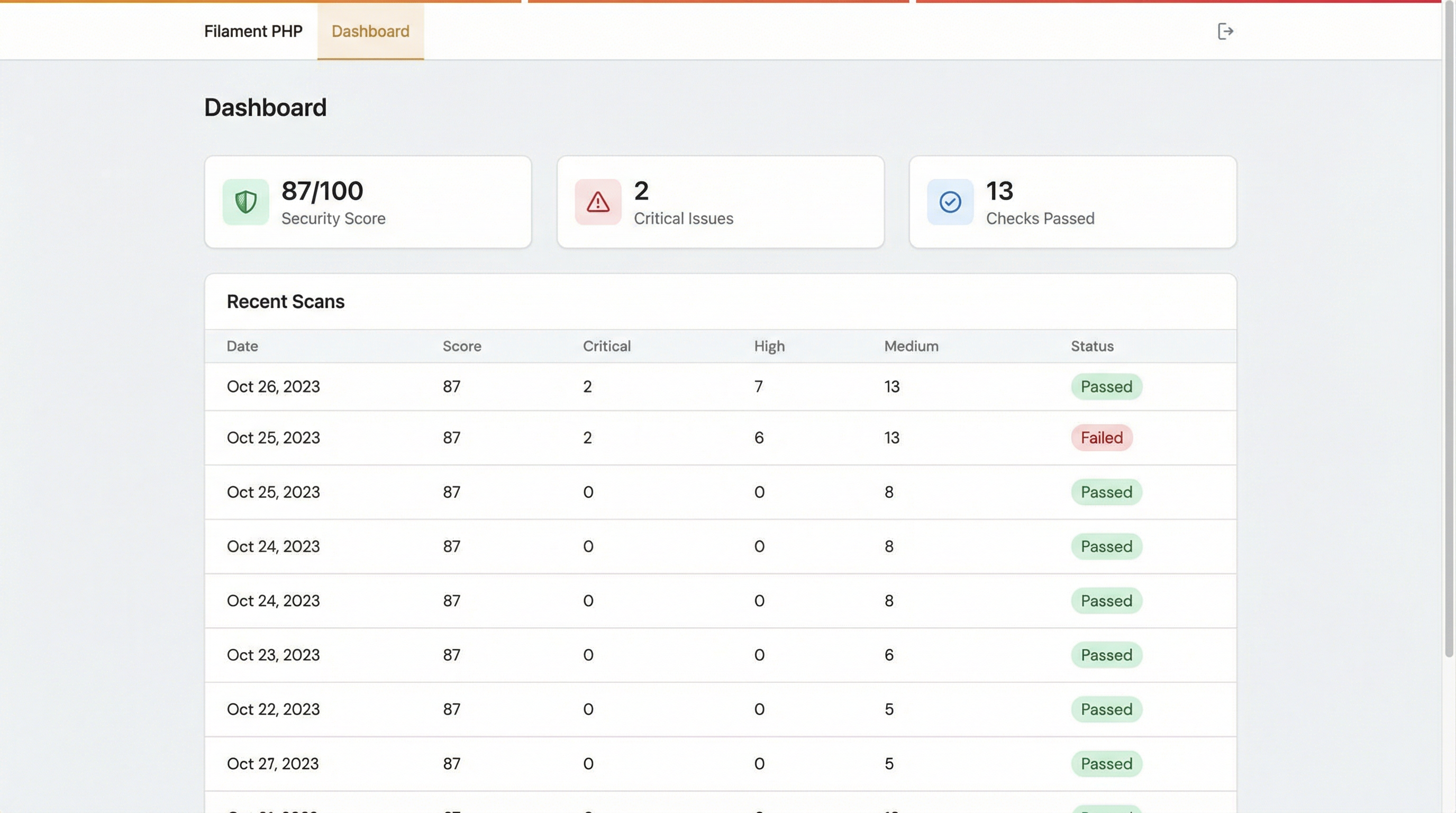
For teams using Filament v5, Vigil ships with a complete dashboard panel. Monitor your security posture visually, track trends over time, and trigger scans directly from the browser.

  • Security score widget — color-coded 0–100 score
  • Critical issues counter at a glance
  • Recent scans table with full history
  • Detailed per-check results with recommendations
  • One-click scan trigger from the browser
Setup Guide
Filament v5 Dashboard
Documentation

Everything you need to get started

Requirements

Laravel Vigil requires a modern PHP and Laravel environment. The Filament dashboard integration is entirely optional.

DependencyVersionRequired
PHP8.2+ Yes
Laravel11.x or 12.x Yes
Filament5.x Optional

Installation

Install the package via Composer. The service provider registers automatically via Laravel's package auto-discovery.

bash
composer require filastudio/laravel-vigil

Publish the configuration file to customize which checks are enabled and adjust behavior:

bash
php artisan vendor:publish --tag=vigil-config

If you want to store scan history in the database, publish and run the migrations:

bash
php artisan vendor:publish --tag=vigil-migrations
php artisan migrate

This creates vigil_scans and vigil_check_results tables. Old records are cleaned up automatically based on the retention setting in config.

Configuration

The published config/vigil.php file allows you to enable or disable individual checks and customize scanning behavior:

php
return [
    // Enable or disable individual checks
    'checks' => [
        'fs.public_folder'        => true,
        'fs.malicious_js'         => true,
        'fs.storage_dangerous'    => true,
        'fs.permissions'          => true,
        'fs.sensitive_exposure'   => true,
        'cfg.php_ini'             => true,
        'cfg.env'                 => true,
        'cfg.session'             => true,
        'cfg.cors'                => true,
        'http.headers'            => true,
        'dep.composer_audit'      => true,
        'ext.hardcoded_secrets'   => true,
        'ext.debug_routes'        => true,
        'ext.telescope_debugbar'  => true,
        'ext.file_integrity'      => false, // Requires baseline
    ],

    // Allowed file extensions in public directory
    'public_allowed_extensions' => [
        'css', 'js', 'jpg', 'jpeg', 'png', 'gif', 'svg', 'webp',
        'ico', 'woff', 'woff2', 'ttf', 'eot', 'pdf', 'map', 'txt',
    ],

    // Store scan results in database
    'store_results' => true,

    // Retention period for scan results (days)
    'results_retention_days' => 90,

    // Notification settings (future feature)
    'notifications' => [
        'enabled'            => false,
        'channels'           => ['mail'],
        'notify_on_severity' => ['critical', 'high'],
        'mail_to'            => env('VIGIL_MAIL_TO', null),
    ],
];
vigil:audit

The primary command. Runs all enabled checks and prints results as a formatted table. Returns exit code 0 on success and 1 when the --fail-on threshold is triggered.

bash
php artisan vigil:audit

Available Options

OptionDescription
--categoryFilter by category (e.g. filesystem,configuration)
--checkRun specific checks (e.g. fs.public_folder,cfg.env)
--fail-onExit with code 1 if issues of given severity are found (e.g. critical,high)
--formatOutput format: table (default) or json
--outputWrite output to a file path
--detailedShow full context: file paths, line numbers, and fix suggestions

Examples

bash
# Run only filesystem checks
php artisan vigil:audit --category=filesystem

# Run specific checks with detailed output
php artisan vigil:audit --check=fs.public_folder,cfg.env --detailed

# Generate a JSON report file
php artisan vigil:audit --format=json --output=storage/security-report.json

# CI/CD: fail the build on critical or high severity issues
php artisan vigil:audit --fail-on=critical,high

vigil:baseline

Generates SHA-256 hashes of all files in public/ and storage/app/public/ and saves them to storage/app/vigil_baseline.json. Once a baseline exists, enable the ext.file_integrity check in your config to compare against it on subsequent scans.

bash
php artisan vigil:baseline

vigil:list

Displays all 15 checks with their category, severity, and current enabled/disabled status as configured in config/vigil.php.

bash
php artisan vigil:list

Programmatic Usage

You can run scans directly from your application code by resolving the VigilScanner from the service container:

php
use FilaStudio\Vigil\VigilScanner;

$scanner = app(VigilScanner::class);
$results = $scanner->run();

foreach ($results as $result) {
    echo $result->check . ': ' . $result->status->value . PHP_EOL;
}

// Access the security score
$score = $scanner->score($results); // 0–100

You can also filter by category or specific checks:

php
// Run only filesystem checks
$results = $scanner->run(categories: ['filesystem']);

// Run specific checks
$results = $scanner->run(checks: ['fs.public_folder', 'cfg.env']);

Filament Integration

Vigil ships with an optional Filament v5 plugin. To enable it, install Filament v5 and register the plugin in your panel provider:

php
use FilaStudio\Vigil\Filament\VigilPlugin;

public function panel(Panel $panel): Panel
{
    return $panel
        // ...
        ->plugin(VigilPlugin::make());
}

Publish the Filament views if you want to customize them:

bash
php artisan vendor:publish --tag=vigil-views

The plugin adds a Vigil navigation item to your panel with the following pages and widgets:

  • Dashboard — Security score widget, critical issues counter, recent scans table
  • Scan Detail — Per-check results with full recommendations
  • Run Scan — Trigger a new scan directly from the browser

Custom Checks

Create your own security checks by implementing the SecurityCheck interface:

php
use FilaStudio\Vigil\Contracts\SecurityCheck;
use FilaStudio\Vigil\Data\CheckResult;
use FilaStudio\Vigil\Enums\Severity;
use FilaStudio\Vigil\Enums\CheckStatus;

class MyCustomCheck implements SecurityCheck
{
    public function id(): string
    {
        return 'custom.my_check';
    }

    public function title(): string
    {
        return 'My Custom Check';
    }

    public function category(): string
    {
        return 'custom';
    }

    public function severity(): Severity
    {
        return Severity::High;
    }

    public function run(): CheckResult
    {
        // Your check logic here
        $passed = true; // replace with actual logic

        return new CheckResult(
            check: $this->id(),
            title: $this->title(),
            status: $passed ? CheckStatus::Passed : CheckStatus::Failed,
            message: $passed ? 'All good.' : 'Issue found.',
        );
    }
}

Register your custom check in a service provider:

php
use FilaStudio\Vigil\VigilScanner;

public function boot(): void
{
    $this->app->resolving(VigilScanner::class, function (VigilScanner $scanner) {
        $scanner->addCheck(new MyCustomCheck());
    });
}

Enums

Vigil uses PHP 8.1+ backed enums for type-safe values throughout the package:

php
// Severity levels
FilaStudio\Vigil\Enums\Severity::Critical
FilaStudio\Vigil\Enums\Severity::High
FilaStudio\Vigil\Enums\Severity::Medium
FilaStudio\Vigil\Enums\Severity::Low

// Check status
FilaStudio\Vigil\Enums\CheckStatus::Passed
FilaStudio\Vigil\Enums\CheckStatus::Failed
FilaStudio\Vigil\Enums\CheckStatus::Warning
FilaStudio\Vigil\Enums\CheckStatus::Skipped

Cleanup

Old scan records are automatically pruned based on the results_retention_days setting in your config. You can also run cleanup manually:

bash
php artisan vigil:cleanup

To schedule automatic cleanup, add it to your routes/console.php (Laravel 11+):

php
use Illuminate\Support\Facades\Schedule;

Schedule::command('vigil:cleanup')->daily();
Automation

CI/CD Integration

Use Vigil in your pipeline to automatically fail builds when security vulnerabilities are detected. The --fail-on flag controls which severity levels trigger a non-zero exit code.

Tip: Combine with --format=json --output=report.json to archive security reports as build artifacts.

yaml
name: Security Audit

on: [push, pull_request]

jobs:
  vigil:
    runs-on: ubuntu-latest
    steps:
      - uses: actions/checkout@v4

      - name: Setup PHP
        uses: shivammathur/setup-php@v2
        with:
          php-version: '8.2'

      - name: Install dependencies
        run: composer install --no-interaction --prefer-dist

      - name: Run Vigil security audit
        run: php artisan vigil:audit --fail-on=critical,high
yaml
security-audit:
  image: php:8.2
  stage: test
  before_script:
    - apt-get update && apt-get install -y git unzip
    - curl -sS https://getcomposer.org/installer | php
    - php composer.phar install --no-interaction
  script:
    - php artisan vigil:audit --fail-on=critical,high
  artifacts:
    when: always
    paths:
      - storage/security-report.json
groovy
pipeline {
    agent any
    stages {
        stage('Install') {
            steps {
                sh 'composer install --no-interaction'
            }
        }
        stage('Security Audit') {
            steps {
                sh 'php artisan vigil:audit --fail-on=critical,high'
            }
        }
    }
    post {
        always {
            archiveArtifacts artifacts: 'storage/security-report.json',
                             allowEmptyArchive: true
        }
    }
}

Ready to secure your
Laravel application?

Install Vigil in seconds and get a complete security overview. Free and open source.

$ composer require filastudio/laravel-vigil